Hood Warfare 2 System Requirements: Minimum & Recommended PC Specs
Compare Hood Warfare 2 minimum and recommended PC requirements, RAM, graphics and storage, then find your Windows specs before buying on Steam.
FAQ
What operating system does Hood Warfare 2 list?
How much RAM and storage do I need?
Is Steam Deck support confirmed?
What are the Hood Warfare 2 PC requirements?
The Hood Warfare 2 system requirements below come from the official Steam listing, checked October 19, 2026. Both tiers describe a 64-bit Windows PC.
| Component | Minimum PC requirements | Recommended PC specs |
|---|---|---|
| Operating system | Windows 10 64-bit, version 1909 or newer | Windows 11 64-bit |
| Processor | Intel Core i5-9600K or AMD Ryzen 5 3600 (6 cores) | Intel Core i5-12600K or AMD Ryzen 5 7600 |
| Memory | 8 GB RAM | 16 GB RAM |
| Graphics | NVIDIA GeForce GTX 1660 or AMD Radeon RX 5600 XT 6 GB | NVIDIA GeForce RTX 3060 Ti or RTX 4060 8 GB |
| DirectX | Version 12 | Version 12 |
| Available storage | 25 GB | 30 GB |
| Network | Broadband internet | Broadband internet |
| Sound | DirectX-compatible sound card | DirectX-compatible sound card |
How much RAM, VRAM and storage do I need?
Steam lists 8 GB of system RAM at minimum and recommends 16 GB. Graphics memory is separate from system RAM: compare your GPU model with the named graphics cards rather than treating spare system memory as a replacement.
Leave at least the listed available storage on the drive where you intend to install. The 25 GB minimum and 30 GB recommendation describe available space, not a guaranteed download size. Future updates can change the requirement.
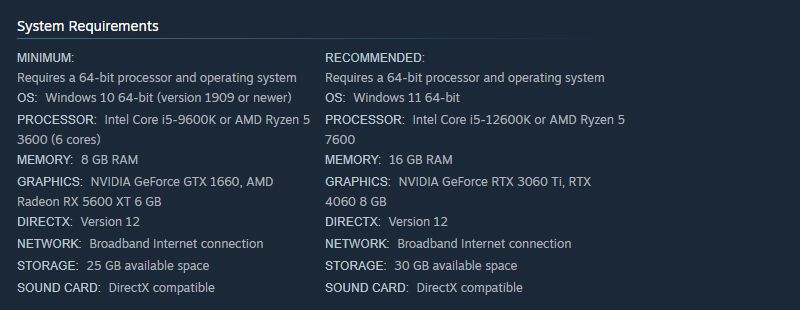
Official Steam System Requirements capture, checked October 15, 2026.
Open the English Steam store page
How do I check my Windows PC specs?
- Open Start → Settings → System → About. Compare Processor, Installed RAM and System type with the table.
- Press Ctrl + Shift + Esc to open Task Manager. If needed, select More details, then Performance → GPU to find the graphics model and dedicated GPU memory.
- Open File Explorer → This PC and check free space on your intended Steam library drive.
- Compare the exact hardware names before purchasing through the Steam download flow.
These are Windows checks, not a measured performance test. The minimum specification does not promise a particular resolution or 60 FPS. This guide has no benchmark results for integrated graphics, laptop GPUs or hardware below the listed minimum.
Can I use these requirements for Mac, Steam Deck or Linux?
No. The listed operating systems are Windows. See the Mac support guide for the difference between a native build and community attempts to run the Windows version. Windows requirements also do not establish Linux, Steam Deck or virtual-machine compatibility. Steam lists Easy Anti-Cheat, so reaching a menu alone would not prove online play works on another setup.
For confirmed platforms, use Where to play. For your first session, use the beginner guide.
What should I check if the game will not launch or join?
Let Steam finish updating and record the displayed build. Use the current patch guide for recent changes and the joining checklist for connection symptoms. Hardware requirements are one check; they do not diagnose every crash, anti-cheat kick or audio problem.
Sources
Related Articles
platforms
Can You Play Hood Warfare 2 on Mac? Support & Compatibility
Check Hood Warfare 2 Mac support, Apple Silicon and Intel limits, and what a community Wine report does and does not prove about online play.
guides
How to Download Hood Warfare 2 on PC (Steam)
Open the official Steam page, buy Hood Warfare 2, install it in the Steam client, and launch the PC version.
guides
Is Hood Warfare 2 AI-Generated? Bots & Production Claims
Separate confirmed Hood Warfare 2 bot matches from unverified AI-generated code, art and voice claims, with official sources and disclosure limits.
Was this helpful?
Thanks for the feedback!